
I'm noticing that when I look at what I draw as a whole it seems more 2 dimensional than i'd like. Any advice?
Topic: My art seem pretty flat.
Posted under Art Talk
I do think your coloring is fine, my advice is boring but I would say to take inspiration in trying to replicate how clothing looks in photos or get some ideas looking at other artists pieces, there's probably pdfs of drawing guides that have a section for more in-depth coloring or even some quick guides on Twitter for specific surfaces.
assassinfenrir said:
I'm noticing that when I look at what I draw as a whole it seems more 2 dimensional than i'd like. Any advice?
It takes a long time to get it right, so don't feel disheartened.
I took a look at some of the art that you've posted and I saw a couple things that might lead to things feeling "Flat"... Before I say anything though, this video kindof outlines the general idea of what I am talking about: https://www.youtube.com/watch?v=blWoQhzz9fM
Our brains use light and shadow to determine the shape of something. Both the shadow of the object on itself (like a sphere gradually getting darker on the side that faces away from the light) and also the shadow the object casts on the things around it. (like the shadow a ball casts on the ground)
The other thing that helps a mind understand that something is "3d" is highlights. Areas that are a little brighter or look like they catch the light a little more give a sense of 3d.
I think i will use post #5643107 as sort of an example to look at here. (Not to pick on it or anything)
In this image, you have a couple that are lit from behind and above. Generally, you've got the right idea, but the shadows dont stay consistent throughout the image. For example, on Drasheen, his front is shaded, but on his arms, it looks like the shadow just stops at his chest and his arms are fully lit from the front. The idea is that his body is casting a shadow from a light source behind him, but the shadows on his arms are not quite following the same rule. Drasheen also seems to be sitting a little off to the side there so it makes it look like the rabbit's left side, buttock and tail should be lit, since there is nothing to cast the shadow on it.
For your shadows:
-Make sure all shadows portray a realistic and consistent light source. [The light and subsequent shadow that is cast should look like it is coming from the same location(s) on all your objects/characters.]
-Try to imagine a single light source somewhere in the room where your characters are and then draw shadows based on that light source.
-When shading, use gradients. Shadows aren't always just on and off. You can use a gradient to portray detail of how much something is curving into shadow.
-Remember your contact shadows. You can show contact by using shadows that get a little darker towards the area where the two objects touch.
Your Light / Color:
It seems like on a lot of your images, you use one or two colors on a character for their skin / fur color, and it might seem like they were just filled in with the paint bucket. You do a good job of breaking this up with your light and shadow already, but one other thing you can do to add more detail is to add highlights. On the areas that are closest to that "light source" I talked about, you can add a highlight which shows that the area is catching more light than the average area around it.
-For the color of the highlight, try going just a bit brighter, but less color saturation.
Here's another video you can watch that shows shading and highlights: https://www.youtube.com/watch?v=MyrySvbuhsk
Holy crap, that was way more advice than I was intending to give. sorry for tldr...
Updated
assassinfenrir said:
I'm noticing that when I look at what I draw as a whole it seems more 2 dimensional than i'd like. Any advice?
fireproof said:
Fantastic points on Shading
To add to fireproof's hot tips, Shading is key in depth,
it's the most straight forward way to make a piece 3d,
You won't find a path shorter! But it isn't the
only Path, Dood!
The hair, the Butt, the Body. Everything is showing in a 2-D
plane, Like the world is a flat surface being viewed from
the top down. Not a bad thing if you're shooting for that,
though if you wanna do 3D, perspective is key!
Far away looks small and close looks big, Dood!
╹‿╹)
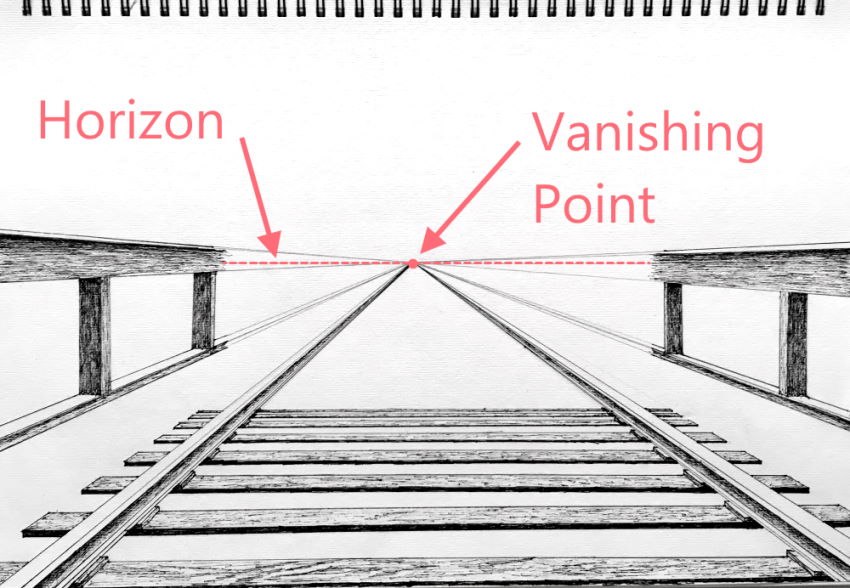
Like this:
post #1756429
This:
post #5786323
or this, Dood! ◠‿╹)~★
post #5356564
Don't follow my example here, if you're not making animations.
I cut out the shadows entirely to save on doodling time,
but this is a great example of what I mean by not needing
shadows with perspective and 3d, Dood!
╹‿╹)
Now it's not gonna be perfect off the bat, But if you
give it your all, your pieces will be looking 3D in no
time, Dood!
◠‿◠)~★
So keep at it, Don't give up and remember 3d hates a
Straight line, Dood!
◠‿╹)~★
fireproof said:
Assurance and helpful advice and links
notkastar said:
More reassurance and helpful tips and examples
To start: thanks for the replies and advice, I really appreciate it!
I'll share my highlighting and shading process hoping it helps make a path clearer.
For my shadows, I use comic book style shading. I make a layer, color in some shadow and lower the opacity to a certain amount. Honestly most of my shading is visualization based assumption, finding references for the exact pose I want, in the exact lighting I want is, to say the least, tricky. Most of my interpretation of how the shadows work is using the "how to draw furries" books I own as reference. I find a pose that close to the one I want try to visualize how the light hits it this way or that way. Also, I do try to gradient my shadows by smudging the edges with the smudge tool. Usually I use a paint type brush to smudge but, I just started trying out the airbrush for smudging.i got the idea from a gif on twitter of someone making a brush specifically for blending skin tones.
For color, I do tend to stick to simpler color schemes. One or two colors for the body and chest, another for the hair, and others for the clothes. Honestly, it's laziness on my part. The simple color schemes mean less work and double checking if I want to draw them again. A gacha artist I am not, they awe, and intimidate me, though I do occasionally do gacha fanart.
Highlights are an area I struggle with a lot. They say, if you know to do shadows, you know how to do highlights, but that's iffy for me, mostly because of the different ways I see people do them. There's the hard white dot at the apex of where the light hits, there's slightly smudged streaks of light, there's faint patches of light reflecting of the characters body, and then there's lines of light on the edge of the character. And don't even get me started on semi realistic style highlighting.
Honestly. I'm aiming for a colored manga style that has a soft feel to it. Hard gradient shadows but with some soft highlighting.
For example this drawing:
https://e621.net/posts/2859770?q=puckoarts
The shading and highlights are simple, but the depth is there.
Or this drawing:
https://e621.net/posts/2738986?q=parent%3A2739059
The shadow are strong but the edges are soft, and the highlights are blended to make them softer.
And this animation my naughty rexkuro:
https://e621.net/posts/4717662?q=naughty_rexkuro
It has hard shading and highlights, but firebrands check have a sort of airbrush highlighting on them.
These types of drawings have the look I'm going for, but my ability to reverse engineer their process only goes so far.
Again, thank you all for the advice and kind words. If you need to see more of my drawings to gain more insight, I have a twitter.(Not shilling, just saying.) It's attached to every drawing I make. Sorry for the long reply, I hope this makes a path clear and I hope to read from you again.
assassinfenrir said:
Highlights are an area I struggle with a lot. They say, if you know to do shadows, you know how to do highlights, but that's iffy for me, mostly because of the different ways I see people do them. There's the hard white dot at the apex of where the light hits, there's slightly smudged streaks of light, there's faint patches of light reflecting of the characters body, and then there's lines of light on the edge of the character.
You phrase these in terms of styles, but if the shading is generally believable, then its 90%+ math.
Which is not to say that all these artists calculate the maths explicitly, they probably don't. But specular highlights, which is the most important category to understand: they are determined by a combination of light position/angle and camera position/angle. Specifically, a large concentration of light must reach the surface, and a large percentage of THAT light must then reach the camera.
You can also think of it in terms of a perspective/mirror problem: what parts will the light 'see' a lot of which the camera can also see a lot of? You can work it backwards or forwards (eg. you can predict that highlights will be more distinct and large towards the centre of the image, as this represents the part of the camera that can detect light from the most possible angles)
The way in which highlights differ from shadows is the need to be precise about angles, much as is required when drawing mirrors. There is less room for error, and any misunderstandings you have about the material of the surface (eg. skin doesn't easily produce highlights, as much of the light is absorbed by skin or diffused chaotically, whereas hard, smooth surfaces like metal don't diffuse or absorb light much, so highlights are very distinct and direct representations of the light->object->camera relationship) will be easy to spot.
An educational tool for this is a 3d modeling program, eg. Blender, because it means you can set up a 'clean room environment' where you can see interactively the relationship between light/shadow, object (a sphere is good), and camera.
Some of the things you describe in stylistic terms are not directly related to specular highlights (and indeed, there are other types of highlight), but when people say 'if you can do shadows well, you can do highlights well' this is probably what they mean -- specular highlights are the strongest in effect and easiest to recognize.
eg :
lines of light on the edge of the character.
This is a light positioning scenario, where you place a secondary or tertiary light to one side of an object; commonly used in cinema to enhance details of the silhouette. Not hard to replicate artistically IMO.
a sort of airbrush highlighting on them
This is probably a diffuse highlight, which occurs on rougher surfaces (where normal speculars do not). Can be thought of as taking a normal specular highlight and scattering it over a larger area; so the result normally appears blended. It's still all a matter of angles (rough surfaces have angles that reflect light in all different directions, so light doesn't get to end up at the camera strongly concentrated much)
Can be more complex than that, though; with skin, this kind of appearance can also be caused by "sub-surface-scattering" : skin is semi-transparent, part of the light enters (rather than being reflected at the surface), diffuses through the area, and is partly reflected out (red 'glow', as red blood cells contribute the most to the final color). Strength of effect relates to amount of red blood cells, so anatomy knowledge helps (cheeks, knees, ears, etc). It's easily seen in ears because they are thin.